What lies clearly at hand

Quote-of-the-day from yesterday’s calendar:

Our grand business in life is not to see what lies dimly at a distance, but to do what lies clearly at hand. –Thomas Carlyle.

Which strikes a chord with me, albeit in a fuzzy late-Friday-afternoon kind of way.

And it’s not to say that we should never look into the distance. It’s important to think about it a little. But unless you’re the Hubble Telescope, simply looking probably isn’t your main purpose in life.

Prognosticating can be fun, but it can be hollow too. Sometimes it just leaves me with a “But now what?” feeling. What’s really satisfying – always and without fail – is when I can see something that needs doing, and do it, and it’s done, and the world is a bit of a better place.

30 posts in 30 days

The first round of submissions on a change proposal at MPOW closed today, so I’ve just emerged back onto the interwebs to catch up with everything that’s happened since the end of May. Notably among them, the Australian biblioblogosphere’s “30 posts in 30 days” blog challenge.

I’m a bit late to be a full participant, and not sure if my brain’s up to even jumping in now, but I did spot a meme I can manage:

Do you snack while reading?
Not invariably, but frequently. I do keep an eye out for crumbs.

What is your favourite drink while reading?
Um, n/a I think – what I want to drink depends a lot more on weather and whim than on activity.

Do you tend to mark your books while you read, or does the idea of writing in books horrify you?
I love marginalia, in fiction or non-fiction, as long as the writer isn’t obnoxious about it. Bonus points if they’re actually insightful. I’m not very insightful, and don’t feel called to do it often; when I am I do it lightly in pencil. Except for one YA book with a character who advocated keeping a cat on a vegetarian diet: for that one I printed out a page from the RSPCA and stapled it in before bookcrossing the book.

How do you keep your place? Bookmark? Dog ear? Laying the book open flat?
I love the idea of bookmarks, but most of my bookmarks are currently in books that I got halfway into 5-10 years ago. Instead I use receipts, remote controls, cushions, a slipper, other books – whatever’s handy.

Fiction, non-fiction or both?
Both, but mostly fiction.

Do you tend to read to the end of a chapter or can you stop anywhere?
Depends on how compelling the book is. And time of day: if I’ve got an appointment, I’ll read up to the last minute and stop mid-sentence; if it’s bed-time then I need to read to the end of the chapter. Or the end of the book.

Are you the type of person to throw a book across the room or on the floor if the author irritates you?
No, but there was one book that was so appallingly bad in every possible way that I burned it.

If you come across an unfamiliar word, do you stop and look it up right away?
No, most of the time I can work it out from context and most of the rest of the time it doesn’t matter anyway.

What are you currently reading?
Dirt, greed, and sex: sexual ethics in the New Testament and their implications for today (brief summary up to where I’ve reached so far: homosexual acts were never a sin, they were just ‘unclean’ like pork and shrimp, and yes this goes for the New Testament too)

What is the last book you bought?
The Hundred Thousand Kingdoms by N. K. Jemison

Do you have a favourite time/place to read?
In/on bed. Though I move around a lot to avoid stiffness – couch, beanbag, etc.

Do you prefer series books or stand-alones?
Stand-alones, or series where each book can stand alone.

Is there a specific book or author you find yourself recommending over and over?
Megan Whalen Turner’s The Thief et seq.

How do you organise your books (by genre, title, author’s last name, etc.)?
Fiction: by language, then author’s surname.
Non-fiction: by pseudo-Library of Congress classification (pseudo because I’m not quite obsessive enough to look them up, I just go my memory/guesstimation).
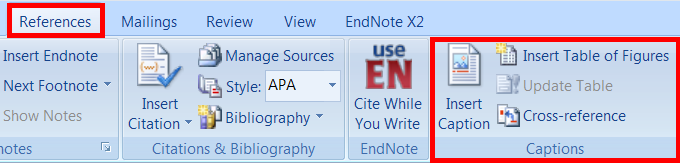
Managing Figures in Microsoft Word 2007

I had a question from a student about this, and had to go away and research it and email her the answer. Since it seems a shame to waste information…

To add captions, refer to figures, and create a table of figures

  1. Select your figure, then go to the “References” menu and click “Insert caption”. It defaults to “Figure 1” but you can name it however you like.
  2. When you want to refer to it in-text, click on “Cross-reference”. Choose reference type “figure”, make sure “Insert as hyperlink” is ticked, and select the figure you want to refer to, then click “Insert”.
  3. Find the place you want to insert the table of figures and click “Insert Table of Figures”. You can configure this however you want it.

Now if you control-click on any of the cross-references or items in the table of figures, it’ll take you to the intended figure.

Note however that if you add a new figure early in the document, Word doesn’t update the table or the cross-references automatically. You can do this manually by:

  1. selecting the table of figures and then clicking “Update Table” and
  2. right-clicking each cross-reference and selecting “Update Field”.

A quicker way to fix it for an entire document at once is:

  1. Select All
  2. Right-click and “Toggle Field Codes”
  3. Right-click and “Update Field”
  4. Right-click and “Update Field” a second time – this time choose “Update entire table”.

If there’s a more sensible way, I wasn’t able to discover it in my tinkering….

Reference / Info-literacy links of interest 21/4/10

Reference
Singer, Carol A. (2010) Ready Reference Collections: A History. RUSQ 49(3)
Ready reference collections were originally formed, and still exist, because they perform a valuable function in providing convenient access to information that is frequently used at the reference desk. As library collections have been transformed from print to electronic, some of the materials in these collections also have inevitably been replaced by electronic resources. This article explores the historical roots of ready reference collections and their recent evolution.

A post on the Oregon Libraries Network notes some differences between the old and new RUSA Guidelines for Implementing and Maintaining Virtual Reference Services.

Library instruction classes
A Librarian’s Guide to Etiquette suggests: A librarian should begin each library instruction class by plucking headphones from students’ ears, confiscating cell phones, and searching all bookbags for contraband food. If there is any time remaining, show them all how to become fans of the library’s new Facebook page.

In Getting Students to Do the Reading: Pre-Class Quizzes on WordPress (at the Chronicle of Higher Education) Derek Bruff cites the idea that learning involves both transfer of information and assimilation of that information, and that as the assimilation is the hard part it should be done in class time while the transfer is handled before class through readings (or videos). He then discusses how he’s tackled the problem of motivating students to actually do their pre-class readings by creating pre-class quizzes — the answers to which he can then skim before class, and alter his lesson plan if students are finding some topic easier or harder than anticipated.

In the Library with the Lead Pipe is a group blog that posts longer, heavily referenced articles. In Making it their idea: The Learning Cycle in library instruction Eric Frierson quotes the idea that people learn better by putting the pieces together for themselves, and discusses ways to use this in library instruction classes, using the topic of “peer reviewed journals” as a case study.

Steve Lawson blogs about Making time at the beginning for questions – starting a library class with the projector off and just chatting informally with the students about their assignments/projects – he says, “It’s like a mass reference interview.”

For myself, I’ve had a lot of success with adding more interactivity into classes (even some large ones with 250+ students) but one series of my classes in term 1 turned clunky because (as I discovered too late) when I was chatting with students about what they needed to know for their assignment, none of them bothered to mention that they hadn’t actually read the assignment instructions yet.

So for my next class I started off by asking them to explain the assignment to me – fortunately these ones had read it and could talk about it, but my fall-back position would be to stop and give them five minutes to read it, because they’re not going to learn anything in class if they don’t know why they’re being told about it.

I spent the rest of the class alternating between asking them how they go about research and adding other sources/techniques they can use. The students were awesome and the class went like a dream. I used a PowerPoint presentation in edit mode so when I asked a question I could write their answers onto the blank page – colour-coded with white pages for my set-speech stuff, yellow pages for their stuff (and my very occasional additions when they reminded me of something) – and embed it into their subject guide after the class:

What about you: what other techniques have you read about / tried for library tutorials?

Mobile vs Smartphones & other links of interest 14/4/10

Mobile vs Smartphones
Roy Tennant suggests not making any more mobile websites as research suggests more people (in the US) are getting smartphones that can support anything a normal web-browser can support. (Though I don’t know of any smartphone that supports a 1024×768 screensize…) Smartphone applications seem to be trending instead. The iLibrarian rounds up her Top 30 Library iPhone Apps (part 2 and part 3). Why an application when you’ve already got a website? Phil Windley points out that “If my bank can get me to download an app, then they have a permanent space on my app list.” The trade-off is that whereas a website should work on any browser, smartphone apps often need to be in proprietary formats (the Librarian in Black particularly complains about Apple’s iPhone in this respect).

Web 2.0
Common Craft has a 3-minute video explaining “Cloud Computing in Plain English“.

The Metropolitan Museum of Art Libraries and Brown University Library provide a “dashboard” of widgets on their websites displaying current statistics about library usage.

View from the top 🙂
The University Librarian at McMaster University Library blogs results from their laptop survey. Apparently laptop circulation now accounts for about a third of their total circulation stats; their survey looks into how students are using the laptops.

The Director of Librarys at the State University of New York at Potsdam blogs about “What I’ve Learned” in the first 10 months of her job there.

Scandal of the week…
Barbara Fister summarises recent discussion about EBSCO as the “New Evil Empire” in her Library Journal article “Big vendor frustrations, disempowered librarians, and the ends of empire“.

Fun
Alice for the iPad – one of the ways technology can enhance the book.

Links of interest 25/3/10

Resources
C-SPAN Video Library “indexes, and archives all C-SPAN programming for historical, educational, research, and archival uses.” (Content is primarily US politics but see here for overlap with other subject areas.) All programs since 1987 can be viewed online for free.

Twitter
Following in the popular footsteps of the Fake AP Stylebook Twitter account (“Use a hyphen to join words together, a dash to separate two words that really don’t like each other.”) come rival accounts Fake AACR2 (“2.17B1. Describe an illustrated item as instructed in 2.5C. Optionally, add woodcuts, metal cuts, paper cuts, etc., as appropriate.”) and Fake RDA (“2.3.3 When attempting to parallel title, line title up to proper title, put title in reverse, turn left, shift into drive, turn right.”)

Neat stuff

Links of interest 4/3/2010

Subject Guides
Springshare have created a Best of LibGuides LibGuide to share ideas about “the best of what the LibGuides system has to offer”.

Gale notes on Twitter that “We analyzed search usage growth for 5k libraries; 20% of them use widgets. The libraries using widgets had 60% higher growth.” Widgets can be built from their website (among other tools for measuring and increasing usage).

Infolit by video
Using video to address an immediate research need is an answer to a faculty complaint with students not researching broadly enough. The librarian put together a video in 30 minutes, posted it on his blog, subject guide, and course management system, and watched the video stats climb as students watched it.

COPPUL’s Animated Tutorial Sharing Project collects video tutorials that can be shared among library systems to avoid reinventing the wheel – including project files so libraries can tweak it to fit their environment. The ones I’ve seen are licensed with a “share-alike” Creative Commons license (meaning you can use it and change it but you have to license your finished product with the same license). You can browse or search for databases eg JSTOR.

Miscellaneous Web 2.0
7 Things You Should Know About Backchannel Communication: Mostly backchannel communication happens at techier conferences but 7 Things points out that: “Backchannel communication is a secondary conversation that takes place at the same time as a conference session, lecture, or instructor-led learning activity. This might involve students using a chat tool or Twitter to discuss a lecture as it is happening, and these background conversations are increasingly being brought into the foreground of lecture interaction.”

10 Technology Ideas Your Library Can Implement Next Week “to start creating, collaborating, connecting, and communicating through cutting-edge tools and techniques”.

Measuring the impact of web 2.0 (via a colleague via the LIS-WEB2 mailing list):

Links of interest 2/2/10

Foursquare
Not a chain of convenience stores – this Foursquare is a website/application that lets you use your cellphone etc to “check in” when you reach locations like cafes, movie theatres, libraries, etc. At its worst this floods your friends with endless notifications: “Now I’m at the dairy! Now I’m at home! Now I’m at the busstop! Now I’m at work! Now…!” But at best you walk into your favourite cafe and:

  • read tips from other customers about what to order or avoid;
  • win a prize from the cafe itself;
  • discover that your friend is in the area and arrange for them to meet you for a quick cuppa.

Some recent blogposts discussing the value of Foursquare for libraries (read the comments as well!) include:

Publishing scandals du jour
EBSCO buys up exclusive electronic access to a number of popular periodicals which will be removed from other databases that used to provide them. Reactions:

During negotiations between Amazon and “big 6” publisher Macmillan over pricing of ebooks, Amazon removed all Macmillan titles (electronic and print) from its database. Reactions:

In case you’re curious about non-Amazon options, there’s a number of online bookstores in New Zealand and I’ve recently discovered The Book Depository in the UK with free international shipping.

Bookcovers in LibGuides
Springshare have announced a partnership with Syndetics so we can now use Syndetics bookcover images in our LibGuides. This is just like using the images from Amazon before – when adding a featured book just insert ISBN, click icon, and voila a cover image – but click the “S” (Syndetics) icon instead of the Amazon icon. An added advantage is that Syndetics works with ISBN-13 as well as ISBN-10 (Amazon is limited to ISBN-10).

European theses
The DART-Europe E-theses Portal gathers and provides “access to 123327 full-text research theses from 210 universities sourced from 16 European countries”.

Links of interest 13/1/10

Web collaboration

  • Tinychat lets you instantly set up a temporary chatroom with its own short url you can share with anyone you want to join you. Once everyone has left the chat it disappears.
  • Flockdraw does the same for the virtual whiteboard.

Virtual reference

Potluck

Deborah

Links of interest 23/12/09

Christmas tree made from books
“star topper” by LMU Library
used on a Creative Commons
BY-NC-SA license
(Photos of tree construction.)

M-libraries (libraries on mobile devices
Library on the Go (pdf) “explores student use of the mobile Web in general and expectations for an academic library’s mobile Web site in particular through focus groups with students at Kent State University. Participants expressed more interest in using their mobile Web device to interact with library resources and services than anticipated. Results showed an interest in using research databases, the library catalog, and reference services on the mobile Web as well as contacting and being contacted by the library using text messaging.”

library/mobile: Tips on Designing and Developing Mobile Web Sites shares “Oregon State University (OSU) Libraries’ experience creating a mobile Web presence and will provide key design and development strategies for building mobile Web sites”.

Usability
Infomaki: An Open Source, Lightweight Usability Testing Tool describes a tool developed by New York Public Library to spread the usability testing load among visitors to their website – visitors are asked if they want to answer a single question; if not, they’re not bothered again; if they do answer it they’re given the option to answer another one. Because it’s not asking much of an investment in time a lot of people will do it, and then because it’s so easy a lot will answer more than one: “In just over seven months of use, it has fielded over 100,000 responses from over 10,000 respondents.”

University of Michigan has made available two reports about the usability of their LibGuides.

Search interfaces
Google Labs is trialling Image Swirl which adds an “images related to this one” functionality to their image search in a lovely visual way.

Happy Holidays!