More fun with weeding

Things found today:

  • a bunch of 1992 press releases from a company I’ve never heard of;
  • a government guide to decimal currency for businesses, prepared when NZ changed from pounds and shillings in 1967 – very cute and absolutely fascinating, but we’ve got copies in other branches where it’s more likely to be used. I read it cover to cover before respectfully disposing of it;
  • a pair of books which perfectly fit our criteria to be disposed of (another copy in another branch; not quite in our subject area; have had practically no use) – but they were so lovely we couldn’t bring ourselves to do it and they’re now back on the shelves;
  • moths. As I pulled down several bundles of journals (tied together with binding tape a decade or so ago and clearly never touched since) a couple of moths flew out at me. I wasn’t fast enough to dispose of them along with their erstwhile home, but with luck the tidier shelves will prove an environment too hostile for them to breed in.

What, will these hands ne’er be clean?

Lampshade
Our library is soon to be getting a new and much-needed lift, to make room for which we are undertaking a large collection management exercise (aka “weeding”, though I personally prefer the “pruning” metaphor – getting rid of both deadwood and of nice enough shoots in order to make the collection as a whole bear more fruit) in part of our collection.

While studying for my MLIS, in a temporary fit of determination to actually study, I came up with a mnemonic for twelve ways pruning could benefit a collection. I can’t remember it anymore, but I’m still a great fan of the process, so this post title doesn’t refer to any kind of guilt, but rather much more prosaically to the fact that, while we’re working our way through this, for approximately 7.5 hours of each day my hands are grey with decades-old dust.

My favourite candidate for deaccessioning so far is Objections to removal of Fendalton shops: shops proposal in doubt (this link may not work for very long…). It was a slim A5-sized thing, the kind of quarter-flushing-type work our bindery used to do decades ago. I opened it up to find the barcode and discovered it wasn’t a bound report; it was a pocket. A pocket containing two newspaper clippings. From 1966.

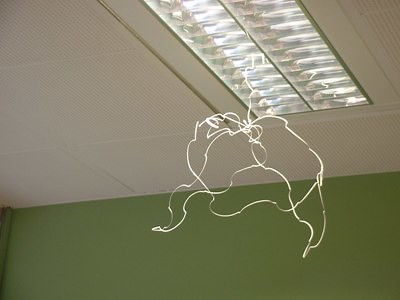
It’s now being recycled. The relatively nice books (duplicates and such) we put out for students to browse through, but the really ridiculously thick-with-dust what-were-we-thinking? ones we put in the recycling bin; we’re green that way. We’ve also been dismantling plastic ringbinders to extract the cardboard inside for recycling, and tearing apart spiral-bound reports to recycle the paper and throw out the wire/plastic. Today (possibly a little bored by now of wielding the “cancelled” stamp) I used some spiral-binding wire to make a bracelet for my sister (Merry Christmas!); and my colleague, inspired by the artistic possibilities in the length of wire I tore from another ancient report, made the sculpture you see above, which she’s kindly allowed me to name “Lampshade”.

More fun things to do with Skype

We’ve been having a look at possible new designs for our library website and today we’ve been running usability testing on two favourites. What we do is have the tester in one room with a facilitator beside them, a note-taker behind them, and next door a group of observers watching a) a view of the computer screen and b) a closed-circuit video of the tester. (The note-taker is in the room in case the video link breaks. Testers are told other observers are watching but that we’re not recording.)

Normally for the closed-circuit link we use video equipment booked and carted over from the AV department, but today when I arrived to do my duty as an observer I discovered they’d set it up using Skype instead. It worked well: there were problems with sound volume (a function of the hardware: we used our regular webcam, but a clip-on microphone for the tester would probably be better), but quality otherwise was just fine.

(The usability testing was, as usual, fascinating. Although it covered the library website as a whole, there were several points where testers were using the library catalogue (of which, I was recently part of a project group to find and fix as many things as we could fix for free in a short timeframe), and one question asked was if they’d noticed any of the multitudinous changes. Yes: they noticed the new colour scheme. On the plus side, they approve.)

Web 2.0 and Library 2.0

(Rather belatedly: the text of my contribution to our institution’s report-back session after the Lianza 2007 conference. I had a five-minute time limit or I wouldn’t have composed a speech in such detail. Links are to my blog posts about each conference paper. The papers themselves are at the Lianza website.)

Web 2.0 and Library 2.0 are the buzzwords of the decade. They’re all about the new kinds of interactive websites out there, and about the new ideas about getting our users participating in improving our libraries.

Last millenium (I love being able to say that) most web pages were just like a page in a book: someone wrote it, and a bunch of people came along and read it. This millenium, more and more websites are like a whiteboard where the person who owns it hands out a pen to everyone who comes to visit. So you get blogs where visitors can comment. Wikis where visitors can fix typos and add information. Websites where users can create social groups and share information with each other. All of that is Web 2.0.

Library 2.0 is the realisation that a lot of people like this approach — sharing information instead of just taking it. And it’s the idea that if we let people participate in the library like this, then they could help us make our services more useful to them.

This is a huge idea, which is why there’s a lot of talk about it, both for and against. At the conference, I went to at least eight papers about it, so most of them I’m just going to skim over.

I’ll start with the ones against — or at least, the cautious ones. Peter Darlington talked about the IT perspective – about how they have to be careful with new technology, planning for the worst. Modern systems are extremely complex, so they have to make sure that anything added to it doesn’t compromise its security, and doesn’t make everything crash.

Andy Neale talked about how we don’t have to jump on every bandwagon. We should focus on what we’re trying to achieve: he was very keen on figuring out what you want to do first, and only then working out how you’re going to do it technically.

Brian Flaherty and Paul Sutherland were more enthusiastic about Web 2.0. They did point out that there’s no use in just setting up blogs and wikis if they don’t actually add value to our services. But we can use modern technologies to make our search systems easier to use, for example. And we can use them to get users participating in the library.

Paul Reynolds talked more about users participating and creating content, and about harnessing that. We create subject headings, which is great, but if we let users add information about levels we don’t look at, that’d be even better. Or if we let users present search results in a completely different format — like showing books about Captain Cook on a map according to where they were published; or a Beethoven CD side-by-side with an encyclopaedia article about him; or an email every time a new book about cochlear implants is added to the catalogue. We don’t have the time to do all this sort of thing ourselves, but if we made our data openly accessible then our users could do it.

All of this might sound pretty theoretical, so I’ll get into some examples of what libraries have been doing. The University of Waikato has been creating interactive tutorials, online library tours, and podcasts (that’s essentially blogging by voice instead of typing). A lot of the technology they used to do all of this was available for free on the web.

CPIT have been working on podcast library tours for the same reason as Waikato, so students can listen to them whenever and wherever they need them. They also created a video tour in NZSL, and they’re wanting to do a tour in Te Reo. Again, they talked about focusing on the users, not the technology.

And for the same reason I want to mention the Dental Library at Otago — they didn’t use any new technology at all, but it was the same idea of getting students participating in their own learning. Instead of the normal library tour where students trail around listening passively, the Dental Library created a treasure hunt where the students were essentially creating their own tour.

So you don’t need to use technology to get users participating in the library – but it can let you do some really amazing things. I’m going to finish up with the Horowhenua Library Trust. Their council asked them to help gather all the pieces of the local cultural heritage that were scattered among small organisations and private individuals. So they created a piece of free web software and they asked the people in their community to participate by adding their own information onto the website.

At the conference they played us a recording of a builder who’d never seen a computer in his life — but within an hour and a half of going into the library, he was cataloguing images of machinery for them. They were overwhelmed with volunteers — retired secretaries, people who’d say they could maybe do half an hour a day, and now they’re doing it full-time, four days a week. People are logging in and adding information about photos that no-one else could identify.

Their view of Web 2.0 is of “radical trust”: trusting their community to create their own library — and by giving that trust, they’re getting an amazing digital library that they couldn’t ever have created without that community’s participation.
What non-librarians think of libraries

Rhonda Gonzalez is asking about the top myths about libraries.

One of the things we tried for Library Week here was an “In 2017, libraries will be…” display – shamelessly stealing the idea from National Library’s LIANZA 2007 campaign and asking students what their vision of the library in ten years time will be.

Answers so far are on Flickr. We haven’t got a huge number of responses, but we’ll probably leave it up for another couple of weeks (ie until the end of exams) to see how it grows.

I’m now thinking towards next year’s Library Week – say, a display showing “a day in the life of a librarian” with all the things we do in a day beyond issuing books….

Full disclosure

Of course we did have glitches of varying problematicity over the week. In no particular order but my memory:

  • screensavers! We used our normal log-in to run the Skype stations, and so the screensaver kicked in every 15 minutes. At one point I fixed it to kick in only every 30 minutes; sekrit IT codes or something were needed to make it not kick in at all, and everything was always too hectic to actually get around to this.
  • speaking of hectic, it was the last week of term before end-of-year exams. I don’t think the “too busy studying” thing actually had that much effect, but on Friday the “too busy getting drunk” thing definitely did.
  • in testing, a couple of us had weird video effects, like a yellow translucent bar down the middle of the screen; or our preview image showing pink; or video freezing. Perusing the Skype forums suggested using the older but more stable version 2.5.0.154 – we switched accordingly and never had the problem again.
  • dropped calls for mysterious reasons. This often required one library phoning another as not all stations were visible from a service desk so they mightn’t be aware of the problem. Hypotheses included mischievous students messing with it, screensaver issues, and gremlins. Once it was our wireless connection failing (though otherwise it behaved impeccably all week).
  • a couple groups of students making rude gestures and saying ruder things. Well, there’s always a couple who’ll drag the rest down.
  • quality was better at some libraries than others – blurry images, timelag, sometimes voice and image out of sync. Don’t know whether this was equipment/computer-related, or bandwidth-related.
  • webcam out of alignment with screen, so eye contact fails. Not much way to fix this with present technology, but the problem was magnified for those of us who projected onto larger screens.
  • a computer blowing up. I didn’t hear the full story behind that so like to think that it was just one of those things that happens, nothing to do with Skype, move along now…

Also – not a glitch exactly – it was only between two libraries at a time. Using different software that’d connect one-to-many, or many-to-many, would increase possibilities for sharing events. Of course at this time of year we were all too busy to think about extra events. And also one-to-many would make it much less private for students who wanted to talk to a friend or family member in another city. So, pros and cons; but it’s something worth exploring if we do anything like this again.

And there has been talk of doing something like this again, perhaps in a different time of year – for example during Orientation, or after the settling-in period. So obviously it hasn’t all been bad. šŸ™‚ For myself, it’s been a great buzz seeing it all come together, watching the students get so much use out of it, and each day meeting face-to-face more of the librarians who’ve made this such an amazing event.

Videochat station set up


(Wow, Blogger’s code for images is rather intimidating.)

Okay, this isn’t a very exciting picture and the quality’s pretty bad because I haven’t tried any sort of clean-up. There aren’t any students in it because of library policy that photos with people require permission and I was feeling a tad lazy. And it’s dark because I couldn’t use the flash because the image was being projected.

That said, it gives an idea of how we set up the station: smartboard with image projected onto it; laptop sitting below connected to speakers and webcam. We put our webcam to the right, just above the poster showing the timetable. (Other things displayed were a library week banner, fliers showing the timetable and library tips, and a whiteboard naming the library we were connected to at any given time.) Internet was wireless which only caused a problem once, briefly, late in the week.

This image shows us connected to Lincoln University Library, in their student lounge. (Different libraries set it up in different areas – some near the main entrance, others near the service desk, etc. In my branch we had a good spot that let us combine these two: directly in front of the main entrance so it got lots of traffic, and next to the lending desk so we could quickly respond to problems, and also overhear and respond to students wondering among themselves what it was about.)

Some libraries had it just on a normal computer monitor, rather than projected onto a screen. This wasn’t so visible, but it had the advantage that people could sit down at it. When one of our students wanted to sit down and chat with his sister we brought a chair over for him but it was trickier to adjust the camera angle.

I’ll try and clean up some of my photos over the long weekend and hopefully post something slightly nicer when I’m back on Tuesday.

Videochat success stories

So far today:

  • I chatted with the librarian setting it up at her end, about some alternative ideas that have been raised in email discussions.
  • One of our students came along for a prearranged meeting for his sister in another university – they talked for about a quarter of an hour.
  • One of our postgrads asked whether it’d be possible to use it to talk to a librarian in another library to help with finding what resources that library has (presumably to then get through interlibrary loan). We didn’t actually try this out and I’m not sure if he had a specific application in mind but it’d definitely be possible and is a neat idea.
  • Lots of people stopping to look, wave at people through the screen, and chatting with us at the desk about it – it’s not so glamourous as the rest, but I think this sort of light interaction goes a long way to make us more approachable by users.

Other uses I’ve seen or heard about:

  • Helping a colleague in another branch sort out a problem with wireless access by having her turn her laptop screen to the camera.
  • Another couple of colleagues in different branches talking over the connection.
  • Keeping our manager (at the time in another branch) informed about developments here.
  • Colleagues being able to put faces to names they’d only seen before in emails.
  • Students having fun pulling faces at students in other libraries. šŸ™‚
  • A student in one branch seeing a friend in another: “There you are! I’ve been looking for you!”

Ideas being talked about:

  • using it in Orientation Week
  • using different software over the KAREN network to be connected to several libraries at once
  • possibilities for management purposes (our manager runs two branches so is constantly back and forth)
  • between interlibrary loan departments to save on toll calls
  • distance reference provision

(Well, at least I’m talking about the last two – but people are humouring me and agreeing that they’re nice ideas.)

As I write this, there’s a flurry of Twitter messages over the news that MySpace is going to embed Skype in its interface.

Skyping for Library Week

Generally New Zealand’s Library Week is very focused on public libraries but earlier this year I was asked to come up with some ideas for what we could do in our university library. I brainstormed with a couple of colleagues and somehow came up with the idea of getting together a network of uni libraries from all over the country to have videolinks set up between each pair, throughout the whole week.

A couple of months later, it’s actually happened. I’m now typing this from our front desk with a good view of both my own branch and one of the other branches on campus, and we also have been and will be connected with other cities. 11 libraries are involved from 6 universities – for an example of the timetable seeour timetable – probably a temporary link.

How it works:

We’re using Skype because it’s free, easy to use, and I was familiar with it. šŸ™‚ Each library has a computer station with webcam set up in a public area – here we’re also projecting ours onto a large screen so it’s very visible. The connection is set up to be permanently open for four hours per library, morning or afternoon – so students can see into the library and talk with whoever might be passing, or make a date with their friends to talk over the connection.

People were a bit shy of it to start with but they’re getting more enthusiastic about it, particularly when the opportunity of talking to friends in other cities is pointed out. I’ve heard several students planning to text their friends – and people have passed on stories of students arriving at preplanned times to meet friends. Librarians have been using it too: one person phoned a colleague to come and talk over the connection about something, and I used it myself to talk a colleague through a laptop issue (she held the laptop screen up to the webcam so I could see what was going on).

Libraries being what they are I’ve been writing this post in bits and pieces over several hours so I’ll stop here and post, but I’ll come back later in the week and write more about the experience – glitches, success stories, ideas for future usage. For now I’ll just say that it’s been really great to see it up and running and getting so much interest from our students.

Summary session: Engaging our customers

Vicki Darling & Sue Fargher

Vicki Referred to Ian Brooks; also mentioned Opinionmeter as useful tool. [I’ll have more to say about this when I’m back too!]

Sue Vye suggested with all the knowledge we have sometimes we can be seen as intimidating. More references to Ian Brooks – had been feeling smug until he said “Lots of you will be thinking ‘but I’m already doing that’ – but you’re not.”

Talking in groups and then sharing what got out of conference.

  • Ian Brooks – customers with conflicting demands but didn’t address the issue
  • Ian Brooks – managers making decisions in office – need to come to frontline and see what things are really like
  • how to find out what customers want – two did focus groups with teens but problems of volunteers who are those who come to library anyway. Tools don’t always work.
  • making ourselves available to customers, listening to what they’re saying. We do much telling of what we know; need to listen more. Paula Ryan pointed out that “one size fits all” actually fits no-one
  • Open Polytech library librarian and customer in same group – fast and easy – book ordered in pm delivered next morning. Different things work in different libraries.
  • listening to customers – spend much money on research but gets put in drawer because think current process is working. Customers want to know when books coming overdue and library has consistently ignored it. So don’t just listen – act!
  • accessibility – first impressions count (both from Ian Brooks and Paula Ryan). Making systems and services accessible.
  • phone problems – […I got lost in what was being said here, but something about thinking laterally in how to serve customers]

Listen. Reflect. Act.